🏷️ What Are Smart Labels?
Smart Labels automate product labeling in your Google Merchant Center feed by assigning products to categories based on performance metrics like ROAS, CPA, or Clicks.
The real benefit: Smart Labels let you split products into separate campaigns with individual goals and budgets. This gives you full control over ad spend allocation — shifting budget toward top performers, limiting spend on poor performers, and ultimately achieving more results with the same budget.
💡 How to Use Smart Labels - In a Nutshell
Choose a Setup Strategy
Smart Labels offer four strategies to get started, depending on your goals:
- Light Setup – Simple 2-label approach to separate top performers from money sinks.
- Performance Signals Setup – Detect subtle trends and automate product flow for deeper optimization.
- Best Practice Setup – Proven 4-tier framework to structure campaigns and guide budget allocation.
- Custom Setup – Full flexibility for advanced users who want to define their own rules and KPI thresholds.
👉 Tip: All strategies can be adjusted anytime — you’re never locked in.
Tailor Your Labeling Rules
Once you’ve selected a strategy, you can refine it to fit your campaigns:
- Create or Remove Labels – Add labels that align with performance tiers or campaign goals.
- Set Conditions – Up to 3 conditions per label, based on KPIs (e.g. ROAS > 300%) or attributes.
- Adjust Label Order – Priority matters: once a product gets a label, it won’t be considered for those below it.
Configure Feed Settings
Fine-tune how Smart Labels integrate with your Merchant Center:
- Custom Label (0–4) – Select which feed attribute is overwritten by Smart Labels.
- Analysis Period – Define the lookback window for KPI data (products without data won’t be labeled).
- Refresh Interval – Decide how often labels update automatically, or trigger a manual refresh anytime.
Export Your Feed
- Download the Supplemental Feed via URL or use it directly in Google Ads.
- Automate Updates – Once the feed URL is linked in Google Ads, Smart Labels refresh automatically based on your interval.
📌 Essential Features
Feeds Overview
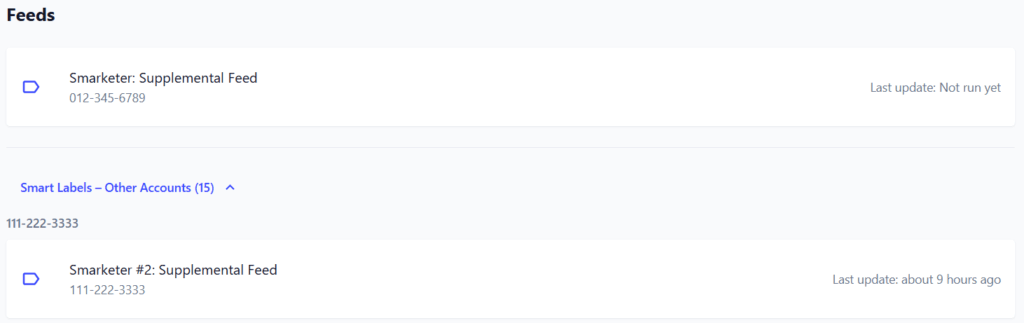
See all feeds created for the selected Google Ads account. Expand to view feeds across other accounts in the same workspace, organized by account ID.
➡️ Benefit: Always know which feeds are active and when they were last updated.
Filters
Narrow down which products Smart Labels apply to:
- MC ID – Target products from a specific Merchant Center feed.
- Feed Label – Focus on products with certain feed tags.
- Country / Language – Segment products by target market.
- Custom Filters – Add extra conditions based on KPIs or attributes.
⚠️ Note: The exported feed always contains all products. Products filtered out here will simply not be labeled.
➡️ Benefit: Precision in applying labels — no noise from irrelevant products.

Duplicates Warning
When duplicates are detected, a warning shows how many. Filtering (by country, language, etc.) reduces duplicates, since they often come from product variants. If duplicates remain, their KPI values are added together and used for labeling.
➡️ Benefit: Transparent handling of duplicates ensures labels reflect real performance.

Labels Each label includes:
- Name – Easy identifier.
- Conditions – Up to 3 conditions (metrics or attributes).
- Counter Bar – Quick view of how many products meet the label.

🛠️ Example Use Cases
- Segment Top Performers
- Challenge: Hard to identify which products deliver the best ROAS.
- Solution: Use Light Setup to quickly label top performers vs. money sinks.
- Benefit: Build dedicated campaigns for high-ROAS products and give them more budget, while reducing spend on underperformers.
- Optimize Campaign Flow
- Challenge: Subtle performance trends get lost in large product sets.
- Solution: Apply Performance Signals Setup to detect hidden winners and losers.
- Benefit: Automate product flow — push emerging winners into stronger campaigns before they peak, and cut budget leaks earlier.
- Strategic Budgeting
- Challenge: Budgets spread too thin across mixed performers.
- Solution: Use Best Practice Setup with 4 tiers (e.g., Hero, Average, Low, Waste).
- Benefit: Structure campaigns around performance tiers, allocate budget strategically, and maximize ROAS with the same ad spend.
- Custom Rules for Specific Goals
- Challenge: Standard frameworks don’t fit unique strategies (e.g., seasonal products, margin-based bidding).
- Solution: Create Custom Setup rules with KPIs and attributes that matter most.
- Benefit: Full control over labeling logic — align campaign structure directly with your business model and goals.
✅ With Smart Labels, every use case leads to the same outcome: more control, smarter segmentation, and better performance with the same budget.